Finding the best optical transceiver price is not about choosing the lowest number on a quote. It is about matching the module to your equipment, network needs, and support expectations. A cheaper unit can become costly if it causes compatibility issues or arrives without dependable warranty coverage.
Before comparing offers, confirm the exact form factor, data rate, reach, wavelength, connector, and host-device compatibility. Check whether the quoted price includes testing, warranty, and technical support. Compare like with like. A 10-kilometer module and a 40-kilometer module are not interchangeable just because their labels look similar. Ask suppliers for clear specifications and written terms, then review the total cost across the expected service life.
For market context, LightCounting founder and optical-market analyst Vladimir Kozlov is a relevant expert to consult. I can’t verify a direct quotation from him on transceiver pricing, so I won’t attribute invented words to him. The practical reminder for buyers is simple: price needs context. That may sound obvious, but it is easy to miss when a quote arrives under time pressure. Even careful buyers can overlook small details, such as coding requirements or replacement lead times. Use this guide to assess those details, compare credible offers, and judge whether an optical transceiver price reflects real value—not just an attractive first figure.
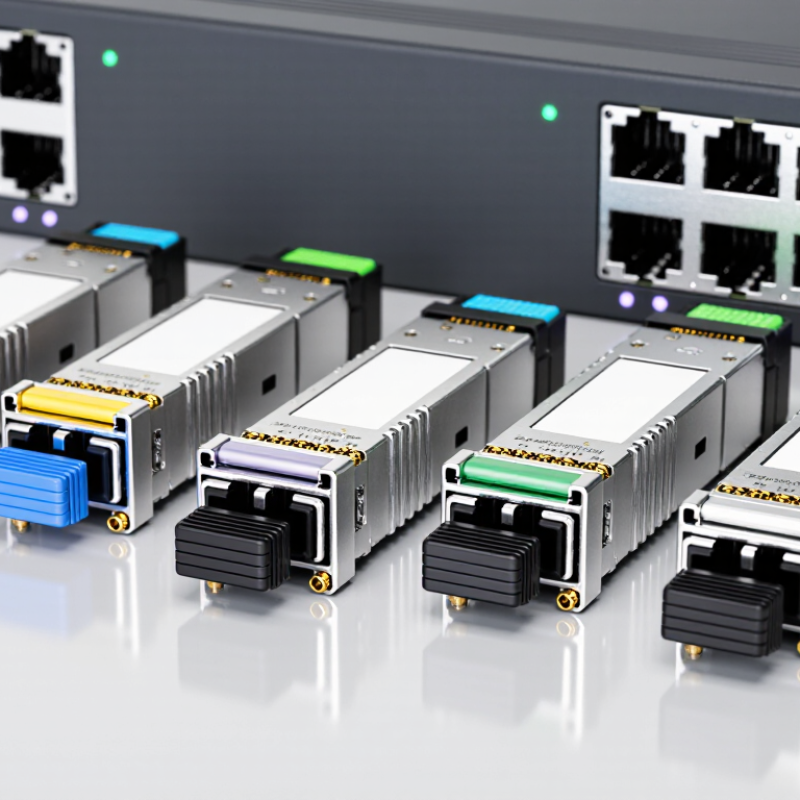
Before comparing optical transceiver prices, define the link’s data rate, reach, and fiber type. A low-cost module may be unsuitable if it cannot meet the required distance or interface. For example, IEEE 802.3 specifies 100GBASE-SR4 for links up to 100 meters over OM4 multimode fiber, while 100GBASE-LR4 supports up to 10 kilometers over single-mode fiber. The connector and fiber path matter, too: check whether the installation uses duplex LC or parallel MPO connections.
Demand keeps rising. The International Telecommunication Union’s Facts and Figures 2023 estimated that 5.4 billion people used the internet that year, about 67% of the world’s population. That figure does not determine a specific link’s capacity, but it highlights why networks need careful planning. Compare modules only after confirming their speed, supported distance, fiber compatibility, and host equipment requirements. A mismatch can mean paying for unnecessary reach—or replacing a module that looked like a bargain.
An optical transceiver can look inexpensive until it fails to match the port. Start with the switch interface, not the product listing. SFP+ typically serves a 10G port, while QSFP28 is designed for 100G. QSFP-DD commonly supports 400G, but host support and lane configuration still matter. Check the equipment documentation. That small check can prevent an unusable purchase.
Match the form factor to the required speed, then confirm the link type. A 10G connection across a short rack may need a different optic or cable than a long fiber run. For 100G and 400G links, check fiber type, reach, connector, and whether breakout operation is supported. A 400G port split into four 100G links can change the cost calculation. It is tempting to compare headline prices; that is not always fair.
Compare the complete cost per working link, including compatible cables, required reach, diagnostics, and warranty terms. Ask whether the quoted module supports digital monitoring if your operations team relies on temperature or optical-power readings. A lower price may be reasonable, but only when the specifications match. I would still recheck the port manual before ordering; compatibility tables can be easy to misread.
How to Find the Best Optical Transceiver Price?
When comparing optical transceiver prices, start with the reach your link needs, not the lowest listed cost. IEEE 802.3 defines 10GBASE-SR operation up to 300 meters over OM3 multimode fiber. That benchmark helps narrow suitable options. If a switch-to-switch route measures 180 meters, an SR module may fit, provided the complete fiber channel meets its requirements. Measure the full route, including patch panels. Small details matter.
A useful quote should specify the data rate, wavelength, connector type, operating temperature, and interoperability requirements. Compare like with like. Ask whether the stated reach applies specifically to OM3, rather than relying on a vague “300 m” claim. Check fiber records, too. Older sections of OM1 or OM2 can change the supported distance, even when most of the cable run is OM3. In practice, documentation is not always tidy.
The 300-meter figure is a reach benchmark, not a guarantee for every aged or poorly terminated channel. Check the link budget and inspect connectors for dust or damage before choosing a lower-cost optic. A small price difference may be worthwhile if testing and replacement costs are lower. I would still verify compatibility in the actual equipment; published specifications cannot reveal every field issue.
An optical transceiver’s price only makes sense when its wavelength matches the link. Check the exact wavelength at both ends, such as 850 nm for many short multimode links or 1310 nm for common single-mode links. Confirm the fiber type and required reach, too. A low-priced module can become an expensive mistake if it cannot work over the installed fiber. Small details matter.
Connector type and optical power deserve a close look. Verify the connector format, such as LC or SC, and the polish type; UPC and APC connections should not be treated as interchangeable. Compare the module’s transmit power and receiver sensitivity with the link’s expected loss. Fiber length, patch panels, and extra connections all consume optical budget. I admit, this check is easy to rush when several quotes look similar.
Finally, confirm device compatibility before ordering. Check the port speed, supported transceiver type, operating temperature, and any host-device requirements. If available, use digital diagnostics to review transmit and receive power after installation. Ask the seller how compatibility is verified and what happens if a unit fails testing. A datasheet may leave gaps, so request clarification rather than guessing. The cheapest listing is not always the lowest-cost choice.
A low-priced optical transceiver can become an expensive link once you add the parts needed to make it work. Compare the complete path: one optic at each end, fiber length and type, connector count, and any patch panels. Check that the modules match the equipment and required reach. A mismatch may mean replacement, extra testing, or a delayed installation. Small costs add up.
Include warranty terms and support in the comparison. Check coverage length, replacement turnaround, troubleshooting access, and whether return shipping is included. Uptime Institute’s 2023 Annual Outage Analysis found that 54% of respondents reported their most recent significant outage cost more than $100,000; 16% reported more than $1 million. These figures are not specific to optical links, but they show why recovery planning matters. A cheaper optic with slow replacement can carry a real operational cost.
Build a simple per-link estimate: optics, cabling, installation, testing, spares, and support over the expected service life. Then compare like with like. Ask for written compatibility details and warranty conditions, rather than relying on a vague “works with” claim. One caveat: forecasting failure costs is imperfect, especially for a new network. Still, a clear estimate is better than judging by unit price alone.
Compare estimated three-year total link cost—not just the optics price—for a pair of 100G transceivers and one link.
The lowest upfront price may not mean the lowest total cost. These illustrative USD estimates show how cabling and support can affect a three-year comparison; actual prices depend on reach, compatibility, quantities, and service terms.
SFP+ typically serves 10G ports, QSFP28 supports 100G, and QSFP-DD commonly supports 400G. Check the equipment manual.
No. Confirm host support, lane configuration, link type, and reach. A connector can fit but still fail to work.
Verify fiber type, reach, connector, and breakout support. One 400G port may split into four 100G links.
Include optics at both ends, cables, installation, testing, spares, and support. Small costs add up.
Check cable length, fiber type, connector count, and patch-panel needs. A short rack link may need different cabling than a long fiber run.
Check coverage length, replacement turnaround, troubleshooting access, and return shipping. Slow replacement can extend downtime.
Yes, if your team uses temperature or optical-power readings. Confirm the module provides the diagnostics your operations team needs.
Request written compatibility details and compare them with the port documentation. Check twice. Tables can be easy to misread.
Not always, especially for a new network. Still, estimate recovery costs and keep suitable spares; the estimate may be rough.
Finding the best optical transceiver price starts with defining the network requirements, not simply choosing the lowest-cost module. Identify the needed data rate, transmission distance, and fiber type, then select a form factor that matches the switch or router port, such as SFP+ for 10G, QSFP28 for 100G, or QSFP-DD for 400G. Use recognized reach benchmarks to confirm the design—for example, 10GBASE-SR can support up to 300 meters over OM3 fiber—while checking that the module’s wavelength, connector, and power requirements suit the link.
Before comparing quotes, verify compatibility with the intended devices and consider the full cost of the connection. Include the transceivers, fiber cabling, warranty, and technical support in your comparison. A lower upfront optical transceiver price may not represent the best value if it requires extra components or offers inadequate coverage. Matching specifications carefully and evaluating total link cost helps balance performance, reliability, and budget.

LumoWave